
The moment an operator steps out of the crane cab and takes the transmitter in hand, the whole risk picture changes. That single move removes the worker from the swing radius, puts them at eye level with the load, and cuts out the shouting match between crane operator and signal person. For lifting teams in hot, dusty environments with long shifts, this is not a minor convenience. It is a structural safety upgrade that changes how every lift is managed.
A radio remote is not simply a wireless version of a pendant. It becomes the primary safety interface for the entire crane. Every motion command, speed change and stop function passes through one handheld device. That means the reliability of the transmitter, the quality of its emergency stop, and the behaviour of its battery all have an outsized influence on whether a lift ends cleanly or badly. Buyers who treat the remote as an accessory are already making the wrong decision.
Why Operator Position Changes the Safety Equation
Traditional cab controls force the operator to look down at the load from a distance, often through glass, glare or structural steel. A wireless system lets the operator walk beside the load, check clearances from multiple angles and stop the machine instantly if a sling shifts or a colleague steps too close. This freedom of movement is the single biggest safety advantage radio remotes offer over fixed pendant stations or enclosed cabs. Facilities that switch from cab mounted controls or fixed pendants to a wireless crane remote typically report fewer struck by incidents and faster cycle times. One certified operator can also run multiple cranes from a single transmitter. This reduces the number of people working close to moving loads. In busy fabrication yards and warehouses, that reduction in foot traffic near the crane path is a measurable safety gain on its own.
Frequency, Range and Signal Stability
Most industrial crane remotes operate on UHF bands, commonly 433 MHz or 2.4 GHz. The lower frequency penetrates steel structures, concrete walls and heavy industrial clutter more effectively. That makes 433 MHz a sensible choice in steel mills, concrete plants and dense workshop environments. The 2.4 GHz band offers higher bandwidth and is widely standardised, but it can suffer interference in areas crowded with Wi-Fi traffic and other wireless equipment.
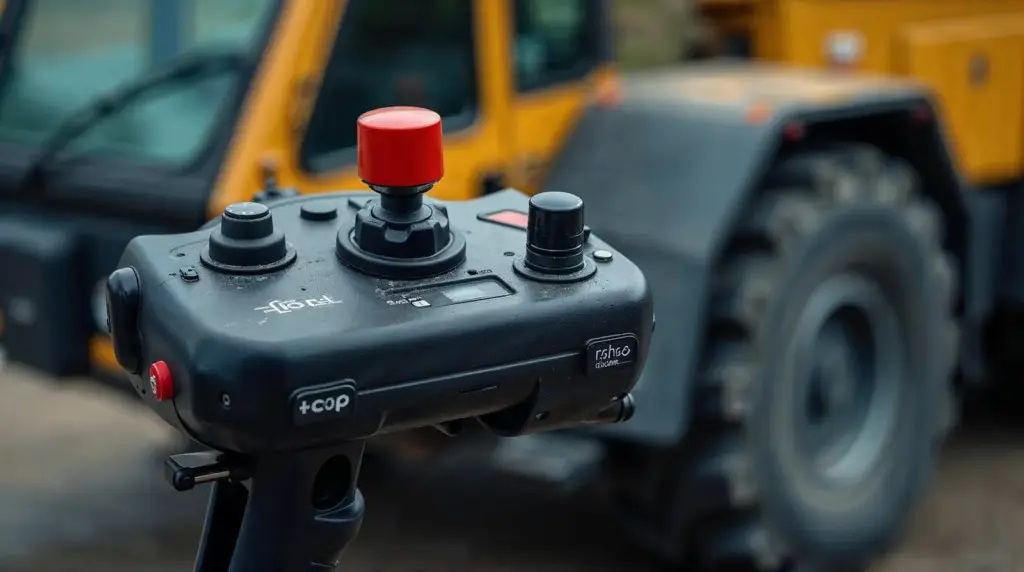
Range should comfortably exceed the maximum distance an operator will ever need. A standard figure is around 100 metres, which covers most overhead travelling cranes. The key is not raw distance but signal consistency. Dropouts are dangerous because a crane that hesitates mid lift can swing or drift. RF stability should be a non negotiable requirement in any shortlist.
Reading the Site Before Choosing a Band
Walk the actual lifting area before committing to a frequency. Note how many steel columns, partition walls and mezzanine floors sit between the operator position and the crane receiver. Also check how many other radio devices share the space. Warehouses with dense Wi-Fi coverage, automated scanners and telemetry systems create a noisy radio environment. In those conditions, the penetration of 433 MHz often beats the bandwidth of 2.4 GHz for crane control.
Ask the supplier about interference handling and unique ID codes. A modern system should assign a very large number of unique addresses so two transmitters cannot accidentally command the same crane. Some systems offer a very large number of unique ID codes, which prevents cross talk between adjacent cranes in the same hall. A site survey with a test transmitter can reveal dead zones before any money is spent.
Emergency Stop and Active Safety Functions
The emergency stop button is the most important physical control on any crane remote. It must be large enough to hit with a gloved hand, recessed or guarded enough to avoid accidental activation, and wired so that it cuts power to crane motion immediately. Operators should test it regularly, not only occasionally. A remote that works perfectly for normal motion but fails to stop the crane in an emergency is a liability, not a tool.
Beyond the emergency stop, look for active safety features such as double speed push buttons or joysticks with smooth ramping. Sudden full speed starts can jerk a load and cause swinging. Progressive control lets the operator ease into motion and stop without shock loads. Some systems also support dual transmitters and dual receivers for synchronised lifts, which is valuable when two cranes must move a single long or awkward load together.
Battery Design and Daily Reliability
A crane remote is only as reliable as its power source. Frequent battery changes interrupt workflow and can tempt operators to ignore low battery warnings. Look for transmitters that run on common AA batteries or rechargeable packs with long service life. Some industrial units offer long battery life on common AA cells, which is a practical benchmark for busy operations.
Battery failure mid lift is a serious event. The system should give clear warning before power drops to a dangerous level, and the receiver should default to a safe stopped state if the signal is lost. Buyers should ask how the receiver behaves when the transmitter goes dead. The answer should always be that the crane halts, not that it continues on the last command.
Durability and Ergonomics for Gulf Conditions
Heat, dust and humidity shorten the life of electronics faster than almost anything else. A crane remote used outdoors in hot, dusty conditions will sit in direct sun, get covered in fine dust and occasionally be dropped onto concrete. The housing should be impact resistant, typically moulded from nylon fibre or a similar material. Rubberised grips help when hands are sweaty or gloved.

Check the protection rating before buying. A remote that works perfectly in an air conditioned showroom may fail within months on a dusty storage yard. Operators should also have a way to secure the transmitter when climbing ladders or moving across walkways. Belt clips, shoulder straps and lanyard points are small details that prevent a dropped remote from becoming a dropped load.
Matching the System to the Lifting Task
Not every crane needs the same remote. A single overhead crane in a small workshop has different requirements from a pair of gantry cranes moving steel beams in a fabrication yard. The number of motion axes, the need for multi crane switching, and the complexity of the lifts all shape the choice. Some operations need a simple single crane transmitter. Others need a customised system that can switch between several cranes without walking back to a base station.
The table below summarises the main selection factors and what they mean in practice. Use it as a checklist when comparing systems from different suppliers. Ask the operators to hold the remote before any purchase decision. Their feedback on weight, grip and button feel is more useful than a specification sheet.
| Selection Factor | What to Look For | Why It Matters |
|---|---|---|
| Operating Frequency | 433 MHz for dense sites, 2.4 GHz for open areas | Signal penetration and interference resistance |
| Range | At least 100 metres, more for large yards | Reliable signal at maximum working distance |
| Emergency Stop | Large guarded button, instantly cuts motion | Stops the crane without delay in a crisis |
| Battery Type | AA cells or rechargeable pack with long life | Reduces mid shift swaps and downtime |
| Housing Material | Impact resistant nylon fibre or similar | Survives drops, dust and heat |
| Control Layout | Ergonomic buttons or joysticks for gloved hands | Prevents fatigue and input errors |
After the table, the next step is to test the chosen system on the actual crane. A bench demonstration is not enough. Run the crane through its full range of motions, walk to the farthest corner of the work area, and deliberately trigger the emergency stop. Only then will you know whether the remote fits the job.
Installation, Training and Daily Checks
A safe remote system is only as good as the people using it. Operators need training on the specific transmitter model, not just general crane operation. They should know how to pair the unit, what the warning lights mean, and how to respond to a signal loss. Supervisors should run a short daily checklist covering battery level, emergency stop function and button response before the first lift.
Installation matters too. The receiver should be mounted where it has a clear line to the transmitter in normal use, away from large metal obstructions and high voltage cables. A poorly placed receiver can create dead zones even with a good frequency choice. The wiring between receiver and crane control panel must be tidy, labelled and protected from heat and abrasion. These details are easy to overlook during a rushed commissioning but hard to fix after an incident.
The closing point is simple. A crane remote is a safety system first and a convenience second. Choose the frequency for the site, demand a reliable emergency stop, respect the battery, and train the operators properly. When those pieces are in place, the wireless remote becomes one of the most direct upgrades you can make to an overhead lifting operation.